Showing posts with label android mobile. Show all posts

Thursday, 29 June 2017

Jio Fiber Broadband Preview Offer

Jio Fiber Broadband Preview Offer


Hello Friends a many day people are waiting a jio broadband. Now Jio company is lunching a jio fiber broadband in some metro city that's name is Dilhi, Mumbai, Jamnager, Ahmadabad. 

Jio Fiber Broadband are 3 mainly data pack and under sub many data pack are available that 3 pack name is below.

1 : Volume Based Monthly Data Plans

2 : Speed Based Monthly Data Plans

3 : Special Monthly Data Plans

This all plan are many sub plans this all are 1 monthly But first you buy this broadband you can get 3 month free broadband data pack in this data pack 100 mbs speed and 100 GB per month used. Then you can subscribe to new paln your choice.

So this is a big offer for all jio users. All 3 palns are many useful to all people because people are freely choice which paln best for us. 

In first volume based monthly data plan minimum 1000 RS. plan in this perday 5 GB data used and Unlimited speed. so you can show in below image other data plan.


Now in second speed based monthly plan minimum 1500 RS to 5500. In this plan daily 50 mbps spped and data limit is 2000 GB per month. You can show in below image other data plan.


Last plan third is special plan for all people and home based because is price worth it's compatible in home data used. you can so in below image other data plan.


=> Now discus which functionality is available in broadband.


in behind one WPS button, Fiber cable port(Green color), Landline port, Three Lan port, Two usb port. The used port is new functionality in jio fiber broadband look is very nice. 

For more Info see this link : https://www.youtube.com/watch?v=9m8lOm_Idv8

Thank you.

Tuesday, 27 June 2017

C Program written without Main()

What Is C Language?
C is a general-purpose, procedural, imperative computer programming language developed in 1972 by Dennis M. Ritchie at the Bell Telephone Laboratories to develop the UNIX operating system. C is the most widely used computer language. It keeps fluctuating at number one scale of popularity along with Java programming language, which is also equally popular and most widely used among modern software programmers.
For More Information : https://www.tutorialspoint.com/cprogramming/
Using Macro :
#include<studio.h>
#define abc main
int abc ()
{
printf(“Hello World “);
return 0;
}
Using tokenpasting :
#include<studio.h>
#define abc m##a##i##n
int abc ()
{
printf(“Hello World “);
return 0;
}

Thank You.
Happy Programming.

Hike New Update 5.0

Hike new update interface redesign and wallet feature with UPI based payments.

 Hike Messenger new update event in New Delhi. This new update completely redesigned offering with the introduction of Hike 5.0. Apart from a complete revamp, the company also launched the Hike Wallet feature, complete with UPI-based payments.

This new feature are available on all android device, in iOS device there are update in July end. Let's start with the new features introduced in Hike 5.0. 


1 : The company say Hike messenger is now a brand new color and fonts. In new update moods are available in profile picture.  

2 : Users can now post text, photos, and videos on their timeline that stay forever.

3 : Other new features include the Magic Selfie, Text to Stickers, App Themes, Chat Themes, and Auto Night Mode. Hike also says that multiple likes are now possible on a single post by a single user.


4 : A new payments and wallet features of Hike. Using UPI, Hike Wallet users can perform instant bank to bank transfers. The company has roped in YES Bank as its banking partner.

5 : Money transfers can be initiated with Blue Packets. Detailing this, Hike says users can choose from over 10 different beautifully crafted envelopes and also add a personalize message to it to celebrate those special occasions. A Blue Packet can be sent to an individual or even a group of friends. It works on a first come first serve basis and a Blue Packet when sent expires in 24 hours.

6 :  It is supports prepaid recharges and postpaid bill payments. 

7 : In new version performance improvements alongside a reduction of the app size from over 40MB to around 25MB.

Thank you

Monday, 26 June 2017

Earn money from uploading a file on the Internet

use Up-4ever

Pays up to 7$ per 1000 downloads depend on downloader location.
Counts downloads from all countries around the world with the highest rates.
Earn money from your files! (videos, songs, software, photos, drawings, articles and others).
Counts downloads from file size 1Byte only.
Rates per 1000 Downloads:


Group A: USA, Canada 7$
Group B: United Kingdom, Australia 5$
Gtoup C: Saudi Arabia, United Arab Emirates 4$
Group D: All Other Countries 3$
Payout via :

Paypal, Perfect Money, WebMoney, Bitcoin, Neteller, Skrill, Payza, Payoneer, Vodafone Cash, Wafacash, Cash Plus, Cih Bank, Algeria poste, Tunisie Poste, E-dinar Smart.

minimum withdraw
The minimum withdraw is only $ 1! But some banks do not allow it.
Payoneerminimum payout : 50$
Western Unionminimum payout: 20$
Wafacashminimum payout: 15$
Cash Plusminimum payout: 15$
Cih Bankminimum payout: 10$
netellerminimum payout: 5$
Algeria posteminimum payout: 5$
Tunisie Posteminimum payout: 5$
E-dinar Smartminimum payout: 2.5$
All Other Payment Methodminimum payout: 1$

Register Here:

How to download facebook video

How to download Facebook video

Hello friends today i teach you how to download Facebook video. when you show any video in Facebook and you think to download but you don't know how to download so just follow this step.

Steps :-

1 : Go to Facebook.

2 : Find video you like to download.

3 : Right click on that video you want to download.


4 : Now you can click show video URL as per above photo and then copy that URL link.

5 : Now go to  http://www.downvids.net/  and open.

6 : Then paste link in download box that you copy video URL.


7 : Select video format that you want to download.

8 : You also download mp3 audio file by click checkbox. 


9 : Click Download this video button and video is downloading.

Thank you.

Sunday, 25 June 2017

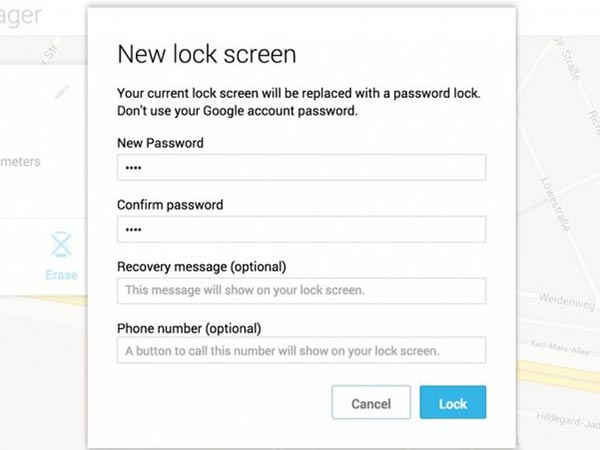
Unlock Password Using Android Device Manager

Unlock Password Using ADM

If you are wondering what is ADM, it is nothing but Android Device Manager. You can easily unlock your mobile using this from any desktop or laptop. Here's what you have to do-
Step 1. Go to Android device manager site.
Step 2. Sign in to your google account.
Step 3. Now click on 'Lock' option.
Step 4. Enter a new Password and confirm your new password.
Step 5. Now reboot your locked phone and enter the newly set password. Voila! You've unlocked your phone successfully!