Tuesday, 27 June 2017

Hike New Update 5.0

Hike new update interface redesign and wallet feature with UPI based payments.

 Hike Messenger new update event in New Delhi. This new update completely redesigned offering with the introduction of Hike 5.0. Apart from a complete revamp, the company also launched the Hike Wallet feature, complete with UPI-based payments.

This new feature are available on all android device, in iOS device there are update in July end. Let's start with the new features introduced in Hike 5.0. 


1 : The company say Hike messenger is now a brand new color and fonts. In new update moods are available in profile picture.  

2 : Users can now post text, photos, and videos on their timeline that stay forever.

3 : Other new features include the Magic Selfie, Text to Stickers, App Themes, Chat Themes, and Auto Night Mode. Hike also says that multiple likes are now possible on a single post by a single user.


4 : A new payments and wallet features of Hike. Using UPI, Hike Wallet users can perform instant bank to bank transfers. The company has roped in YES Bank as its banking partner.

5 : Money transfers can be initiated with Blue Packets. Detailing this, Hike says users can choose from over 10 different beautifully crafted envelopes and also add a personalize message to it to celebrate those special occasions. A Blue Packet can be sent to an individual or even a group of friends. It works on a first come first serve basis and a Blue Packet when sent expires in 24 hours.

6 :  It is supports prepaid recharges and postpaid bill payments. 

7 : In new version performance improvements alongside a reduction of the app size from over 40MB to around 25MB.

Thank you

Monday, 26 June 2017

Earn money from uploading a file on the Internet

use Up-4ever

Pays up to 7$ per 1000 downloads depend on downloader location.
Counts downloads from all countries around the world with the highest rates.
Earn money from your files! (videos, songs, software, photos, drawings, articles and others).
Counts downloads from file size 1Byte only.
Rates per 1000 Downloads:


Group A: USA, Canada 7$
Group B: United Kingdom, Australia 5$
Gtoup C: Saudi Arabia, United Arab Emirates 4$
Group D: All Other Countries 3$
Payout via :

Paypal, Perfect Money, WebMoney, Bitcoin, Neteller, Skrill, Payza, Payoneer, Vodafone Cash, Wafacash, Cash Plus, Cih Bank, Algeria poste, Tunisie Poste, E-dinar Smart.

minimum withdraw
The minimum withdraw is only $ 1! But some banks do not allow it.
Payoneerminimum payout : 50$
Western Unionminimum payout: 20$
Wafacashminimum payout: 15$
Cash Plusminimum payout: 15$
Cih Bankminimum payout: 10$
netellerminimum payout: 5$
Algeria posteminimum payout: 5$
Tunisie Posteminimum payout: 5$
E-dinar Smartminimum payout: 2.5$
All Other Payment Methodminimum payout: 1$

Register Here:

How to download facebook video

How to download Facebook video

Hello friends today i teach you how to download Facebook video. when you show any video in Facebook and you think to download but you don't know how to download so just follow this step.

Steps :-

1 : Go to Facebook.

2 : Find video you like to download.

3 : Right click on that video you want to download.


4 : Now you can click show video URL as per above photo and then copy that URL link.

5 : Now go to  http://www.downvids.net/  and open.

6 : Then paste link in download box that you copy video URL.


7 : Select video format that you want to download.

8 : You also download mp3 audio file by click checkbox. 


9 : Click Download this video button and video is downloading.

Thank you.

Sunday, 25 June 2017

Unlock Password Using Android Device Manager

Unlock Password Using ADM

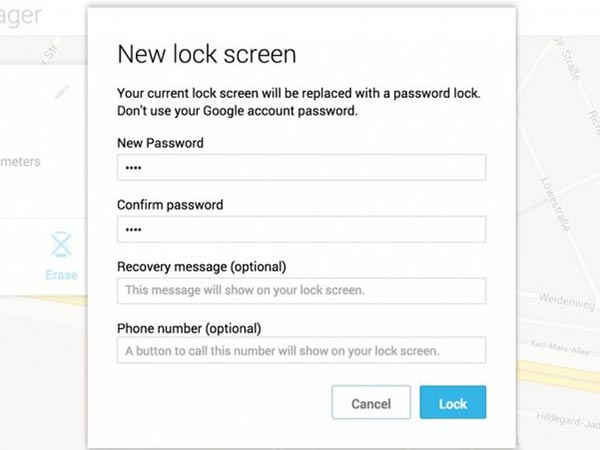
If you are wondering what is ADM, it is nothing but Android Device Manager. You can easily unlock your mobile using this from any desktop or laptop. Here's what you have to do-
Step 1. Go to Android device manager site.
Step 2. Sign in to your google account.
Step 3. Now click on 'Lock' option.
Step 4. Enter a new Password and confirm your new password.
Step 5. Now reboot your locked phone and enter the newly set password. Voila! You've unlocked your phone successfully!

Sunday, 5 March 2017

HOW TO HIDE AND UNHIDE FOLDER USING CMD

hello friends this is my another post today i'm showing how to hide and unhide folder using cmd(command prompt)
firsst of all start your pc or laptop then which folder you can hide so you can just watching.
then go to run and type cmd. in cmd you can write follwing code.

hide
--> write code in cmd
attrib<space>drivename[foldername]<space>+h +r +s +a
example: attrib d:desktop +h +r +s +a
       

unhide
--> write code in cmd
attrib<space>drivename[foldername]<space>-h -r -s -a
example: attrib d:desktop -h -r -s -a


you can try your self in your laptop and pc. this trcik are useful in windows system. i'm also use this tricks
in my laptop and upload in youtube. following the link

https://www.youtube.com/watch?v=cUmVj4XLYTg

thank you.

Wednesday, 11 January 2017

How to Hack Wi-Fi: Performing a Denial of Service (DoS) Attack on a Wireless Access Point

What ia DoS?

 Hello Friends we are learn to my previous post What is DoS attack and how it work, Now my second post to learn to perform a Distributed Denial Of Service Attack, also known as DDOS Attack on a Wireless Access Point(AP).First of all let us understand What is DDOS Attack ? DDOS Attack is a attack in which we make a malicious attempt to use the network resources to disconnect the User from the specific service run over the Internet.

There are many ways to perform a DDOS attack wireless AP but I am going to show you the most powerful method which is sending deauthentication frames to the AP with aireplay-ng which is a part of aircrack-ng tool set.

How to Hack Wifi Password using Aircrack-ng

Following step how it work

Step : 1 Open Kali Linux Terminal
Fire up Kali Linux and open a terminal in it.Let’s make sure our wireless adapter is recognized by the Kali or not.Type the following command to check. 

iwconfig


Step 2 : Putting our Wireless card in Monitor Mode
Now I am going to put the wireless card in monitor mode with airmon-ng command.Type the below command

airmon-ng start wlan0

Step 3 : Monitoring the Available AP’s
Now we take a look at the available AP’s in our range by using airodump-ng.

1 airodump-ng mon0

step 4 : Conducting DDOS Attack
Now what we have to do is open a new terminal and type the following command in it.

aireplay-ng -0 0 -a mon0 -a 08:BD:43:61:FA:64  –ignore-negative-one

You have successfully performed a DDoS attack  on a AP.After some time you will see that none of the device connected to that specific AP will work , you can use multiple Laptops and use the same procedure on all the AP in your range to jam the whole network.
This trick are only for knowledge purpose.
Thank you 

What is DoS Attack?

DoS Attack (Denial of  Service)

Denial of Service or DoS attack is a type of network attack designed to flood the target network or machine with a large amount of useless traffic so as to overload it and eventually bring it down to its knees. The main intention behind DoS attack is to make the services running on the target machine temporarily unavailable to its intended users. DoS attacks are usually carried out on web servers that host vital services such as banking, e-commerce or credit card processing.


A common variant of DOS attack known as Distributed Denial of Service (DDoS) attack has become quite popular in the recent days as it is more powerful and hard to detect. A typical DoS attack has a single place of origin while a DDoS attack originates from multiple IP addresses distributed across two or more different network.

Diagram of DDoS :


Unlike a DoS attack where the attacker uses one single computer or a network to attack the target, a DDoS the attack originates from different pre-compromised computers belonging to different networks. As the attacker uses a number of computer systems from different networks each residing in different geographical locations, the incoming traffic looks natural and therefore becomes hard to detect.

Some Methods are Involved in DoS Attack. The method are SYN Flood Attack, Ping Flood Attack, 
Teardrop Attack, Peer-to-Peer Attacks.

Protection Against DoS/DDoS Attacks.

DoS attacks can easily be handled by blacklisting the target IP that are found to be making too many requests/connections to the server. However, DDoS attacks are complicated as the incoming requests seem more natural and distributed. In this case it is hard to find the difference between the genuine and malicious traffic. Taking an action at the firewall level to blacklist suspected IPs may result in false positives and therefore may affect the genuine traffic as well.